
Merging Data with LEFT JOIN - Exercises
1. The roles of actors
We have data of actors (table actors). And data of roles (table roles).
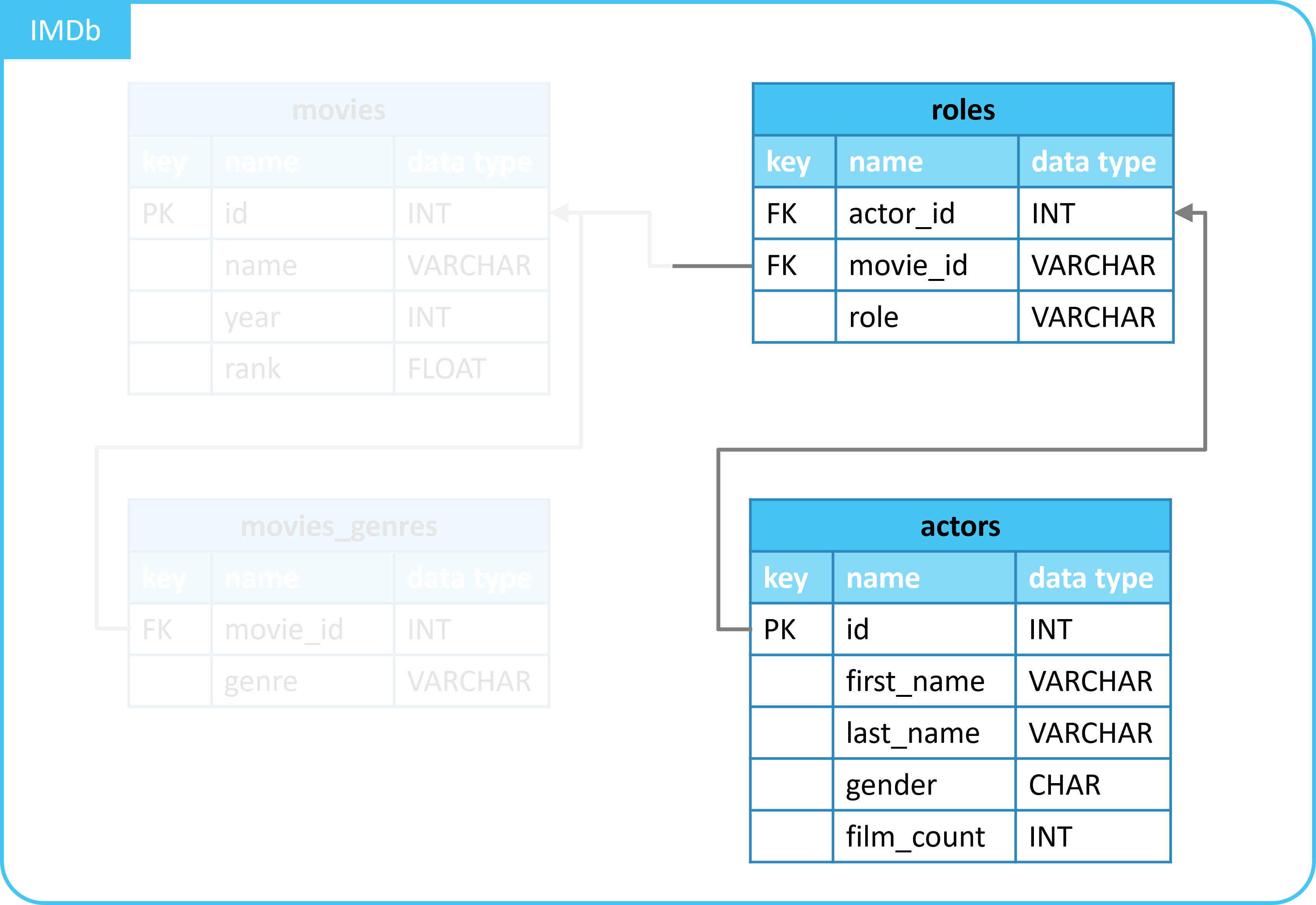
We now want to know which actor fulfills which roles.
For this, we will use LEFT JOIN.
Complete the query below to merge the tables.
- Left table:
actors. - Right table:
roles. - Column
idfrom tableactorsmatches with columnactor_idfrom tableroles. - Use
LEFT JOIN. - Select all columns.
| id | first_name | last_name | gender | film_count | actor_id | movie_id | role |
|---|---|---|---|---|---|---|---|
| 16844 | William (I) | Armstrong | M | 1 | 16844 | 10920 | Lydecker |
| 36641 | Jay (I) | Benedict | M | 2 | 36641 | 10920 | Russ Jorden |
| 42278 | Michael | Biehn | M | 1 | 42278 | 10920 | Cpl. Dwayne Hicks |
| ... | ... | ... | ... | ... | ... | ... | ... |
2. Use aliases
In the previous exercise, we wrote out the table names in full.
We will now use aliases with AS.
Reuse your code from the previous exercise and apply aliases.
- Name table
actors:a. - Name table
roles:r.
| id | first_name | last_name | gender | film_count | actor_id | movie_id | role |
|---|---|---|---|---|---|---|---|
| 16844 | William (I) | Armstrong | M | 1 | 16844 | 10920 | Lydecker |
| 36641 | Jay (I) | Benedict | M | 2 | 36641 | 10920 | Russ Jorden |
| 42278 | Michael | Biehn | M | 1 | 42278 | 10920 | Cpl. Dwayne Hicks |
| ... | ... | ... | ... | ... | ... | ... | ... |
3. Make a specific selection
So far, we have selected all columns.
We will now make a specific selection.
Reuse your code from the previous exercise and make a specific selection.
- Select all columns from table
actors. - Select only column
rolefrom tableroles.
| id | first_name | last_name | gender | film_count | role |
|---|---|---|---|---|---|
| 16844 | William (I) | Armstrong | M | 1 | Lydecker |
| 36641 | Jay (I) | Benedict | M | 2 | Russ Jorden |
| 42278 | Michael | Biehn | M | 1 | Cpl. Dwayne Hicks |
| ... | ... | ... | ... | ... | ... |
4. (Extra) Grouping
We now have a table with all the roles of actors.
By grouping, we will determine how many roles an actor has played.
- Table
actorsalready contains a columnfilm_count. - But an actor might play multiple roles in one film.
Reuse your previous code and write a query.
- Use
GROUP BY. - Group by column
idfrom tableactors. - Count the number of roles with function
COUNT(). - Select the following columns:
first_name.last_name.COUNT(...).
SELECT
  a.first_name,
  a.last_name,
  COUNT(r.role) as roles_count
FROM
  actors AS a
  LEFT JOIN roles AS r ON a.id = r.actor_id
GROUP BY
  a.id;
| id | first_name | last_name | roles_count |
|---|---|---|---|
| 589358 | Caroline | Crosthwaite-Eyre | 1 |
| 178682 | Taylor | Goodall | 1 |
| 119276 | Thomas | Derrah | 1 |
| ... | ... | ... | ... |
5. (Extra) Filtering and sorting
We now have a table with the number of roles of actors.
By filtering and sorting, we will make the result more useful.
Reuse your previous code and write a query.
Such that:
* Filter so that only actors with more than 1 role appear.
* Use HAVING.
* Sort descending by the number of roles.
* Use ORDER BY.
SELECT
  a.id,
  a.first_name,
  a.last_name,
  COUNT(r.role) as roles_count
FROM
  actors AS a
  LEFT JOIN roles AS r ON a.id = r.actor_id
GROUP BY
  a.id
HAVING
  COUNT(r.role) > 1
ORDER BY roles_count DESC;
| id | first_name | last_name | roles_count |
|---|---|---|---|
| 22591 | Kevin | Bacon | 9 |
| 376249 | Brad | Pitt | 3 |
| 35536 | Steve | Buscemi | 3 |
| ... | ... | ... | ... |