
Subqueries Introduction - Assignments
1. Movies with a score higher than average
In our database, we have data of movies, table movies:
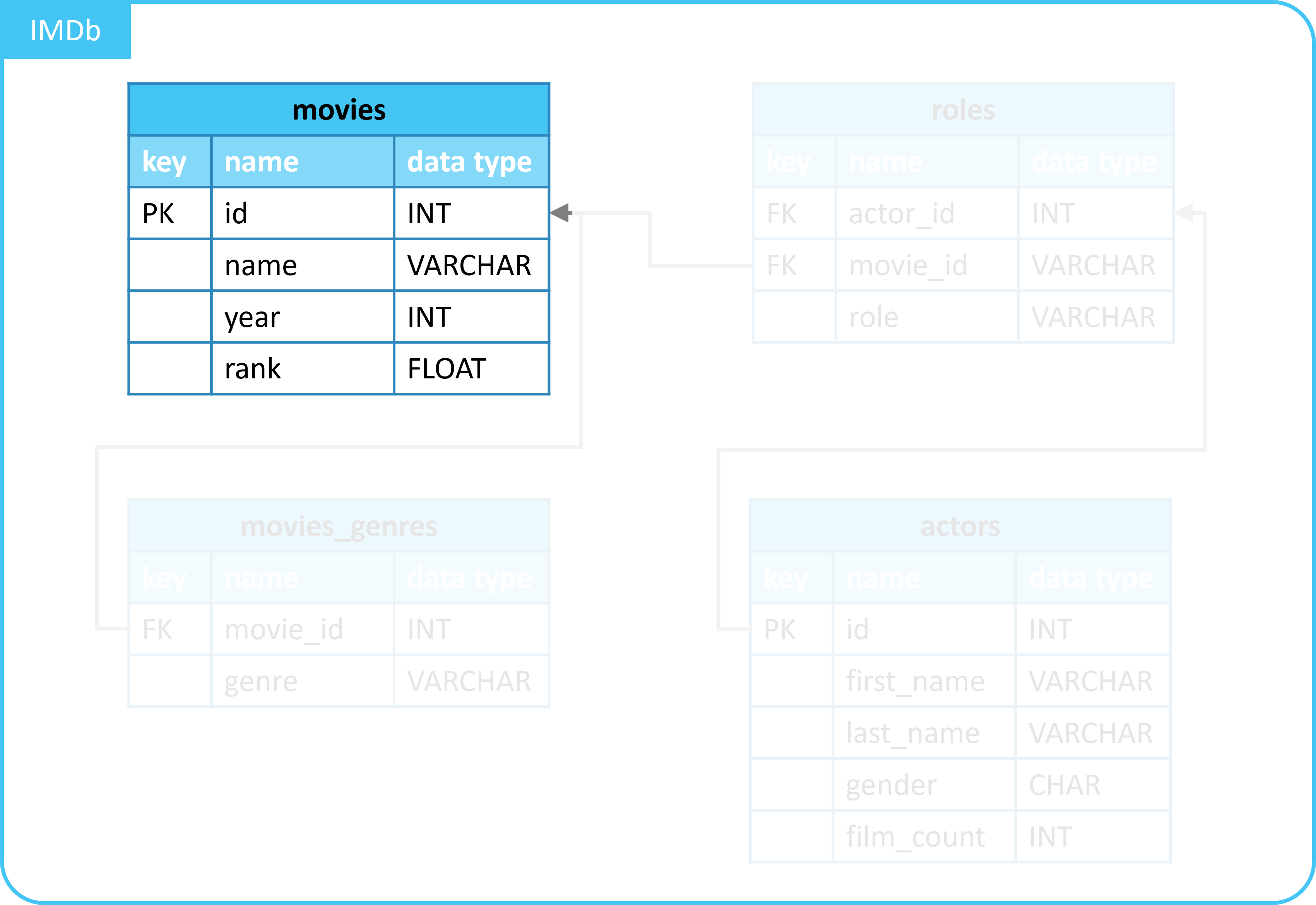
Each movie has a score, in column rank.
In this assignment, we are interested in the movies with a higher score than average.
- We will tackle this step by step.
- We will use a subquery.
1.1. Query to retrieve movie details
Complete the query below to retrieve movie details.
- Retrieve data from table
movies. - Select columns
id,name, andrank.
You should see the following output:
| id | name | rank |
|---|---|---|
| 10920 | Aliens | 8.2 |
| 17173 | Animal House | 7.5 |
| 18979 | Apollo 13 | 7.5 |
| 30959 | Batman Begins | (NULL) |
| 46169 | Braveheart | 8.3 |
| ... | ... | ... |
1.2. Query to calculate average score
Complete the query below to calculate the average score of movies.
- Retrieve data from table
movies. - Select and calculate the average of the scores, column
rank, using theAVG()function.
You should get one number back.
1.3. Query to filter movies based on score
Complete the query below by applying a filter. So that only movies with a score greater than a certain value are shown.
- Reuse your code from question 1.1.
- Add a
WHEREstatement.- Filter on column
rank, the score.- Select values
greater thana score of7.7.
- Select values
- Filter on column
Check the result.
1.4. Adding a subquery
In the previous question, we hardcoded the average score in the filter.
In the question before that, we wrote a query that calculates the average score.
Reuse your previous code and apply a subquery. So that you calculate the average score instead of adding it hardcoded.
- Reuse your code from the previous question.
- Replace number
7.7in theWHEREstatement with a subquery.- The subquery should be your previous query.
- With which you calculate the average score.
- The subquery should be your previous query.
Check the result.
2. (Extra) Movies with a score higher than average
In the previous assignment, you retrieved information about movies based on the score.
Now you need to do something similar.
Write a query to select the movies whose name is longer than the average length.
- Use a subquery.
- Show the following columns in your result:
idname- Length of
name
- Sort by the column with the length of
name. - Use, among others:
SELECT,FROM,WHERE,AVG(),LENGTH(),ORDER BY.
3. (Extra) Actors based on roles
You are going to write a complex query.
We will use 2 tables:
actors: details of actors.roles: details of movie roles.
You will do the following:
- Write a query to determine the most common first 2 letters of a movie role name.
- Example: role name
Tyronefirst 2 letters:Ty. - Use:
SELECT,LEFT(),COUNT(),FROMGROUP BY,ORDER BY ... DESC,LIMIT 1.
- Example: role name
- Write a query using the previous query as a subquery.
- Select only the determined 2 letters.
- Example:
Ty.
- Example:
- Use:
SELECT,FROM, and a subquery.
- Select only the determined 2 letters.
- Write a query using the previous queries as a subquery.
- So that you select details of actors whose first name starts with the determined 2 letters.
- Use:
SELECT,FROM,WHERE,LEFT, and a subquery.
Tip: Write your queries step by step. So you can check the results in between.