
Views
Introduction
With a common table expression (CTE), you can use another query from a name within a query.
- A CTE is only usable within the query where you create it.
- It is therefore not usable from other queries.
If you want to reuse a query within multiple queries, you can work with views.
We will look at this step by step using an example.
1. Example views
We will tackle a problem.
We will eventually use a view for this.
We will build it up step by step.
- First, we look at an example with a common table expression.
- Then we rewrite it with a view.
1.1. Problem Statement
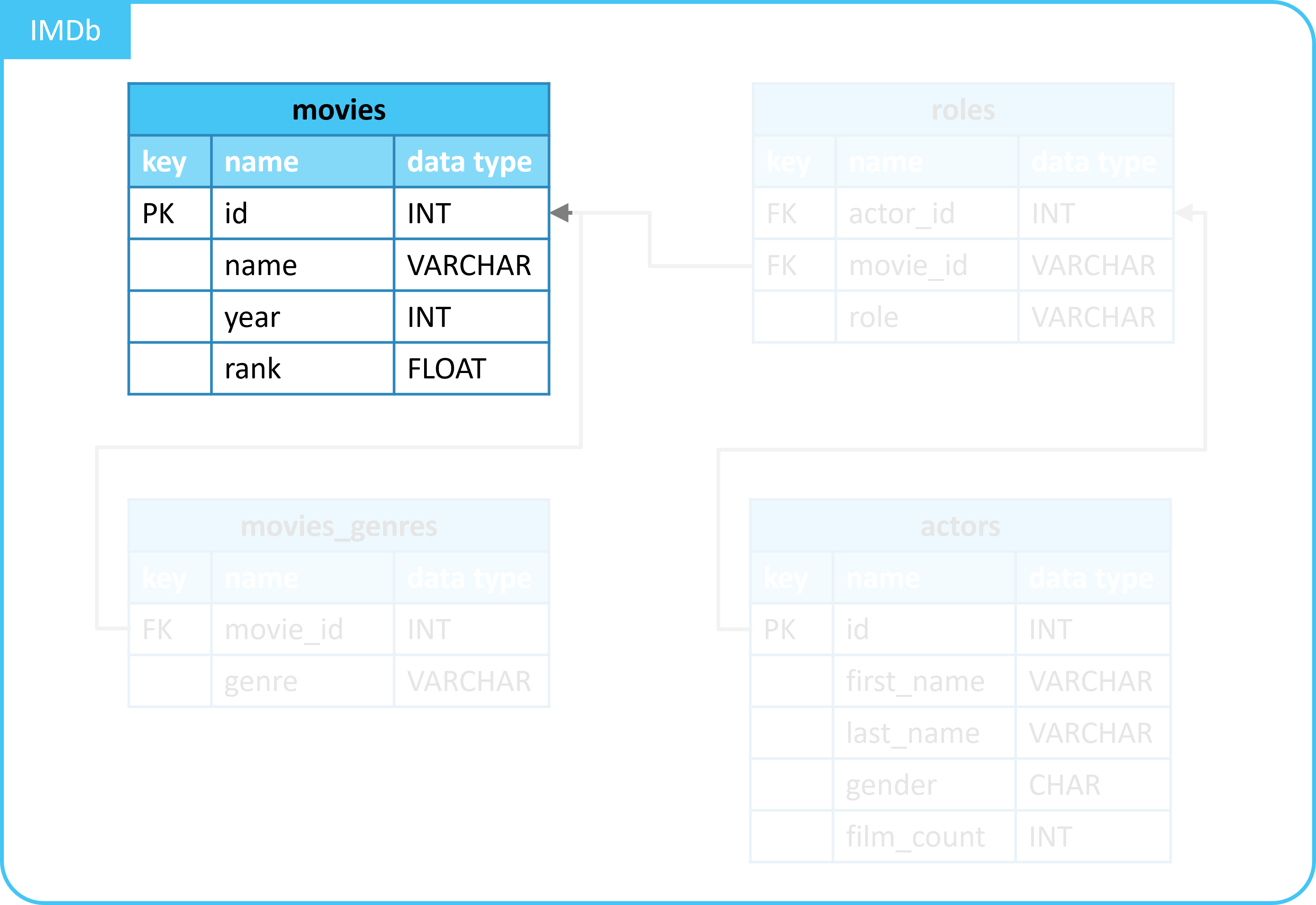
- In the
moviestable, we have details of a movie.- For example, the year, and the score.
- We want an overview of all movies.
- With the addition of:
- The average score of all movies from the year a movie was released.
- With the addition of:
This allows us to see if a movie was better/worse than the average movie from that year.
1.2. Solution with CTE
We solve this problem with a common table expression:
- With the CTE, we calculate the average score per year using
GROUP BYandAVG(). - We add this to movie details with a
LEFT JOIN.
WITH year_details AS (
    SELECT
      year,
      AVG(rank) AS avg_rank_by_year
    FROM
      movies
    GROUP BY
      year
  )
SELECT
  m.*,
  year_details.avg_rank_by_year
FROM
  movies AS m
  LEFT JOIN year_details ON m.year = year_details.year;
| id | name | year | rank | avg_rank_by_year |
|---|---|---|---|---|
| 10920 | Aliens | 1986 | 8.2 | 8.2 |
| 17173 | Animal House | 1978 | 7.5 | 7.5 |
| 18979 | Apollo 13 | 1995 | 7.5 | 7.9 |
| ... | ... | ... | ... | ... |
1.3. Creating a view
Now we will create a view.
- A view is a query that you save and can use elsewhere.
- From all your other queries.
- In contrast to a CTE:
- It is only usable within the query where you create it.
- You can query information from it, just like from a table.
- A view does not store data itself like a table does.
- It only saves the query.
We create a view.
We will explain the syntax later.
When we execute this query, the view named year_details is created.
We can now query data from the view:
| year | avg_rank_by_year |
|---|---|
| 1989 | 6.949999999999999 |
| 1991 | 7.8 |
| 1977 | 8.8 |
| ... | ... |
You see that it works the same as querying data from a table.
1.4. Solution with CTE
We now apply the view to solve our problem:
SELECT
  m.*,
  year_details.avg_rank_by_year
FROM
  movies AS m
  LEFT JOIN year_details ON m.year = year_details.year
| id | name | year | rank | avg_rank_by_year |
|---|---|---|---|---|
| 10920 | Aliens | 1986 | 8.2 | 8.2 |
| 17173 | Animal House | 1978 | 7.5 | 7.5 |
| 18979 | Apollo 13 | 1995 | 7.5 | 7.9 |
| ... | ... | ... | ... | ... |
You see that this gives the same result as the solution with CTE.
But now it is much more compact and readable.
2. View syntax
We have looked at an example of a view.
In it, you can recognize the following syntax:
You do the following with this:
- You create a view with
CREATEandAS.- You give the view a name.
- With this name, you can call the query of the view elsewhere.
- You give the view a name.
- You provide a query that should be executed under this name.
3. View or CTE
The following points provide insight into when to use a view or CTE:
- Ad-hoc queries that you execute only once: use a CTE.
- Repeatedly reused queries: use a view.
- Limiting user access to data: view.
- For example, you can shield part of a table from certain users.
Summary
- A view gives a query a name.
- With the name, the query can then be used elsewhere.
- In all other queries.
- Example:
- A view makes your code more readable and can be used to restrict access.