
Subqueries with EXISTS - Assignments
1. Actors with a specific role
In the IMDb database, we have data on actors and roles:
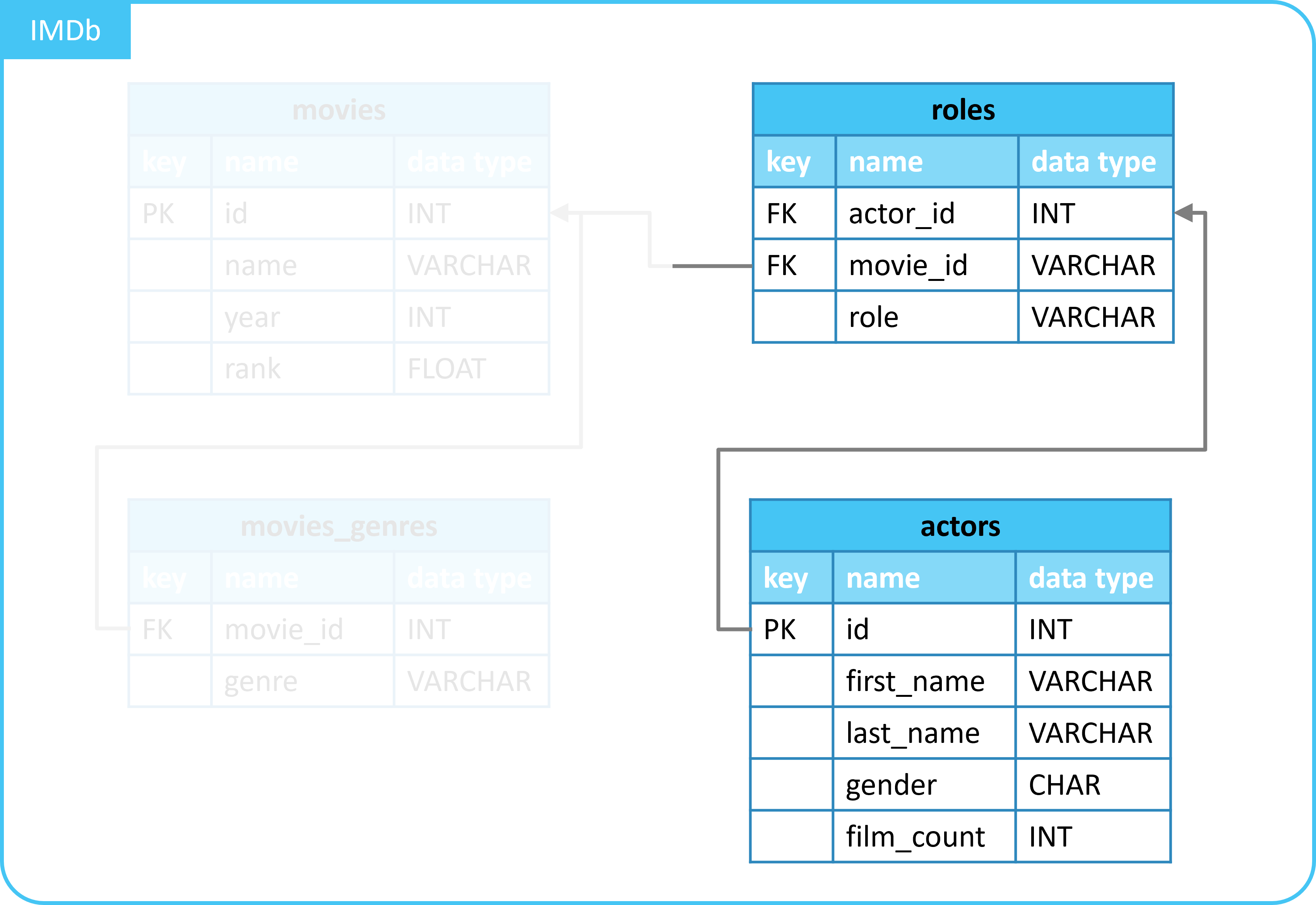
We are interested in the actors who have played a specific role.
- Roles that start with the letter
Q.
Write a query that does this:
- Select all columns from the
actorstable. - Only the actors who have played a role that starts with the letter
Q.
Make use of the following:
SELECT,FROM, andWHERE.- A subquery with
EXISTS.- Select all columns from the
rolestable. - Where there is a match:
- Between the matching columns from the
actorsandrolestables. - And values in the
rolecolumn start with the letterQ.- Use
LIKE.
- Use
- Between the matching columns from the
- Select all columns from the
2.(Extra) Actors with more than 2 roles
The query below retrieves details of actors who have played more than 2 roles:
SELECT
  a.first_name,
  a.last_name
FROM
  actors AS a
  LEFT JOIN roles AS r ON a.id = r.actor_id
GROUP BY
  a.id
HAVING
  COUNT(r.role) > 2;
| first_name | last_name |
|---|---|
| Bill | Paxton |
| Kevin | Bacon |
| Steve | Buscemi |
| Michael (I) | Madsen |
| Uma | Thurman |
| Brad | Pitt |
| Stevo | Polyi |
Here, a LEFT JOIN is used.
Write a query that gives the same result, but using a subquery with EXISTS.
3.(Extra) Actors with a certain name and role names with many characters
The query below retrieves details of actors:
- Whose name starts with a
Q. - Who have played a role with a (role) name longer than
10characters.
SELECT
  a.id,
  a.first_name,
  a.last_name
FROM
  actors AS a
  LEFT JOIN roles AS r ON a.id = r.actor_id
WHERE
  LENGTH(r.role) > 10
  AND last_name LIKE 'Q%'
ORDER BY
  last_name;
| id | first_name | last_name |
|---|---|---|
| 385911 | Van | Quattro |
| 761130 | Kathleen | Quinlan |
| 761233 | Ana Maria | Quintana |
| 386627 | Luke | Quinton |
Here, a LEFT JOIN is used.
Write a query that gives the same result, but using a subquery with EXISTS.
- Tip: within the
WHEREstatement, useEXISTSalong with anANDstatement.