
Common table expressions - Assignments
1. Number of roles in films
We will work step by step with data from the IMDb database.
You need to obtain the following:
- An overview of all films.
- With the number of roles for each film added.
We will use the tables movies and roles.
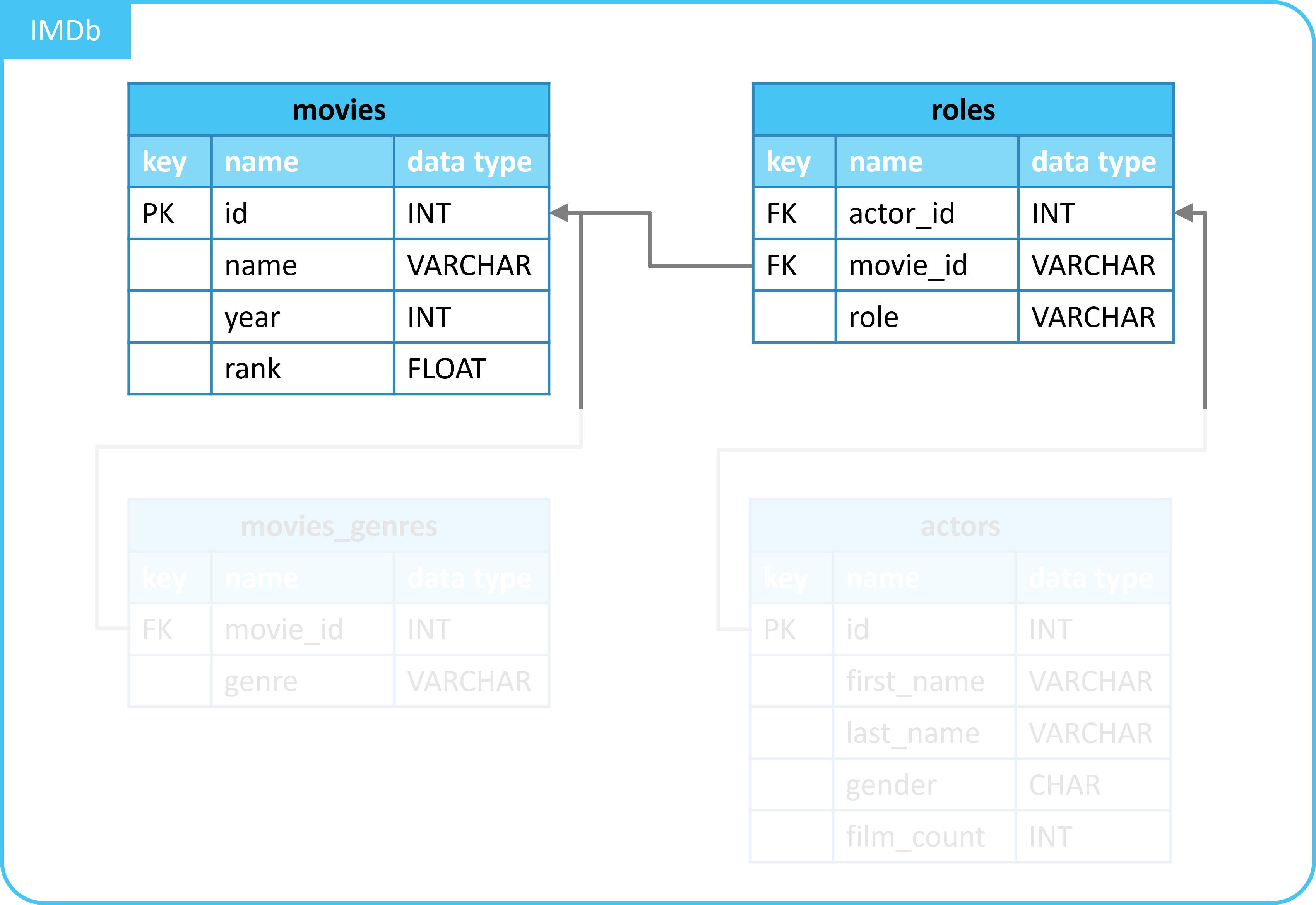
1.1. Details of films
We start with details of films.
For this, you can use the query below.
Execute this query and view the result.
| id | name | year | rank |
|---|---|---|---|
| 10920 | Aliens | 1986 | 8.2 |
| 17173 | Animal House | 1978 | 7.5 |
| 18979 | Apollo 13 | 1995 | 7.5 |
| ... | ... | ... | ... |
You have obtained details of all films with this.
1.2. Number of roles per film
Table roles contains details of film roles.
Write a query that does the following:
- Count the number of roles per film.
Do the following:
- Retrieve data from table
roleswithFROM. - Group by column
movie_idwithGROUP BY. - Select the following columns with
SELECT:movie_id- Count the number of roles with
COUNT(*)- Name this new column
roles_countwithAS.
- Name this new column
| movie_id | roles_count |
|---|---|
| 238695 | 33 |
| 30959 | 62 |
| 17173 | 43 |
| ... | ... |
1.3. Use of a common table expression
You will now combine the 2 previous queries.
You will use the following:
LEFT JOINto merge the data.- A common table expression.
Proceed as follows:
- Reuse your previous code.
- Create a common table expression named
movie_roles.- Place the query that retrieves the number of roles per film in it.
- Use the query that retrieves details of films.
- Add a
LEFT JOINto it. - Link the data from common table expression
movie_rolesto the details of films.- Link on column
id/movie_id.
- Link on column
- Add a
WITH movie_roles AS (
  SELECT
    movie_id,
    COUNT(*) AS roles_count
  FROM
    roles
  GROUP BY
    movie_id
)
SELECT
  m.*,
  movie_roles.roles_count
FROM
  movies AS m
  LEFT JOIN movie_roles ON m.id = movie_roles.movie_id;
| id | name | year | rank | roles_count |
|---|---|---|---|---|
| 10920 | Aliens | 1986 | 8.2 | 30 |
| 17173 | Animal House | 1978 | 7.5 | 43 |
| 18979 | Apollo 13 | 1995 | 7.5 | 97 |
| ... | ... | ... | ... | ... |
1.4. Improve the result
The outcome of the previous query was not very readable.
This is because:
- All columns from table
movieswere shown. - It was not sorted by the number of roles.
You will change this.
Adjust the query as follows:
- Select only columns
idandnamefrom tablemovies. - Sort by column
roles_countwithORDER BYandDESC.
Which film has the most roles?
WITH movie_roles AS (
  SELECT
    movie_id,
    COUNT(*) AS roles_count
  FROM
    roles
  GROUP BY
    movie_id
)
SELECT
  m.id,
  m.name,
  movie_roles.roles_count
FROM
  movies AS m
  LEFT JOIN movie_roles ON m.id = movie_roles.movie_id
ORDER BY
  roles_count DESC;
| id | name | roles_count |
|---|---|---|
| 167324 | JFK | 230 |
| 333856 | Titanic | 130 |
| 313459 | Star Wars | 104 |
| ... | ... | ... |
2. (Extra) Number of genres of films
You will now work with a common table expression yourself.
This assignment is very similar in setup to the previous one.
You need to obtain the following:
- An overview of all films.
- With the number of genres for each film added.
- Use data from tables
moviesandmovies_genres. - Use a common table expression.
Which film has the most genres?
WITH movie_genres AS (
  SELECT
    movie_id,
    COUNT(*) AS genres_count
  FROM
    movies_genres
  GROUP BY
    movie_id
)
SELECT
  m.id,
  m.name,
  movie_genres.genres_count
FROM
  movies AS m
  LEFT JOIN movie_genres ON m.id = movie_genres.movie_id
ORDER BY
  genres_count DESC;
| id | name | genres_count |
|---|---|---|
| 192017 | Little Mermaid, The | 6 |
| 300229 | Shrek | 6 |
| 350424 | Vanilla Sky | 5 |
| ... | ... | ... |