
Subqueries
Introduction
A subquery is a query that is executed within another query.
Why this is useful, we will look at through an example.
Example
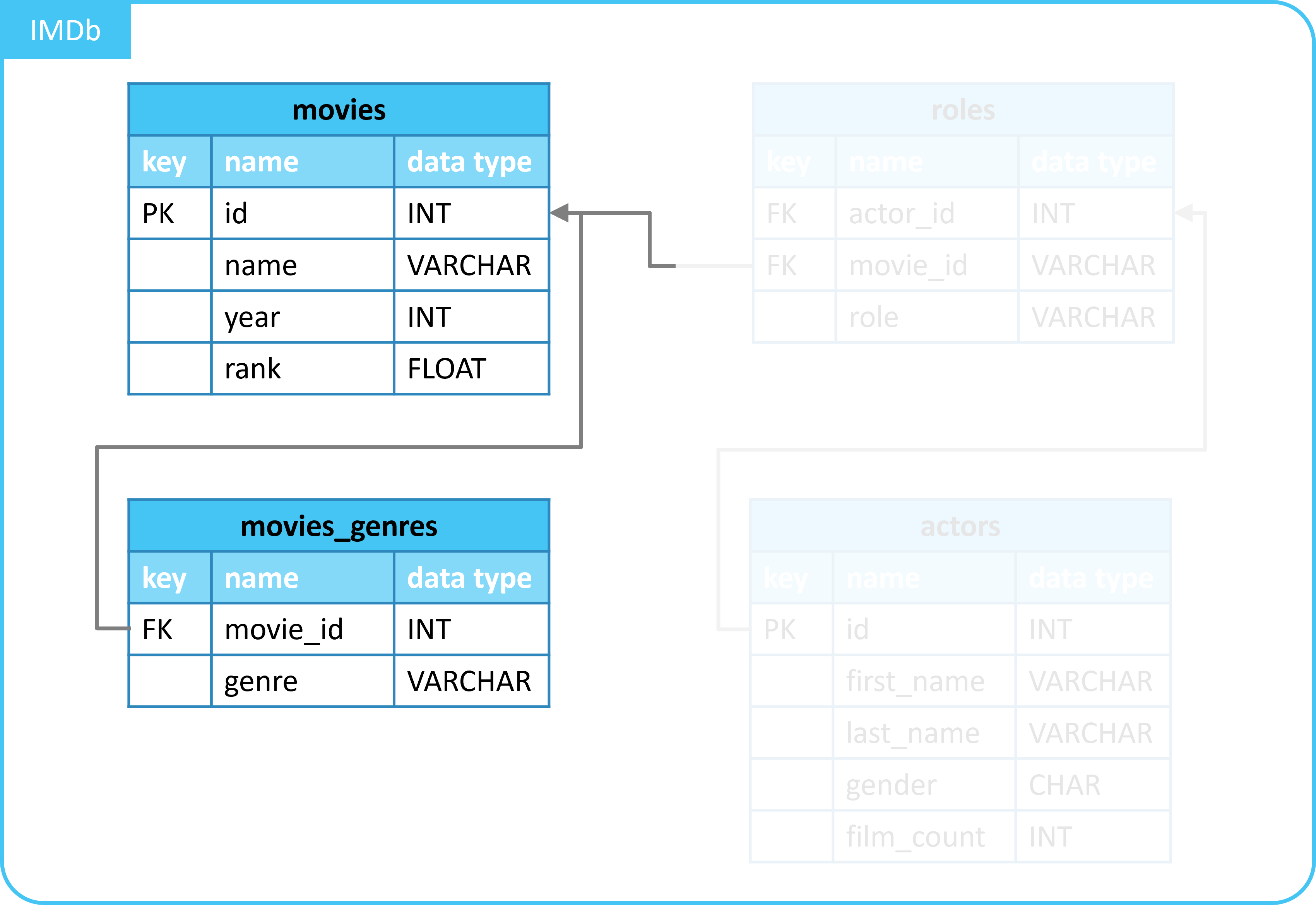
In this example, we want the following:
- A selection of movies from the
moviestable. - Only the movies with the genre
Horror.
Possible solution
We could solve this as follows:
- Join tables
moviesandmovies_genreswith aLEFT JOIN. - Filter on genre
Horror. - Select only columns from the
moviestable.
SELECT
  movies.*
FROM
  movies
  LEFT JOIN movies_genres ON movies_genres.movie_id = movies.id
WHERE
  genre = 'Horror';
| id | name | year | rank |
|---|---|---|---|
| 10920 | Aliens | 1986 | 8.2 |
| 147603 | Hollow Man | 2000 | 5.3 |
| 314965 | Stir of Echoes | 1999 | 7 |
Limitations
However, we do not show any data from the movies_genres table.
- Therefore, it is less neat to use a
JOIN. - You do not need the linked data.
- It is neater to use a subquery.
We will look at different types of subqueries.
1. Application of EXISTS with subquery
In the example, we wanted only movies with the genre Horror.
With a subquery and the EXISTS statement, we can solve this issue.
- Without needing a
JOIN.
The query below does this:
SELECT
  *
FROM
  movies
WHERE
  EXISTS (
    SELECT
      *
    FROM
      movies_genres
    WHERE
      movies.id = movies_genres.movie_id
      AND genre = 'Horror'
  );
| id | name | year | rank |
|---|---|---|---|
| 10920 | Aliens | 1986 | 8.2 |
| 147603 | Hollow Man | 2000 | 5.3 |
| 314965 | Stir of Echoes | 1999 | 7 |
We see the same result as when we used the LEFT JOIN and filtering.
2. Explanation of subquery with EXISTS
A subquery with EXISTS works as follows:
SELECT
  <column_name(s)>
FROM
  <table_name_1>
WHERE
  EXISTS (
    SELECT
      <column_name(s)>
    FROM
      <table_name_2>
    WHERE
      <condition(s)>
  );
- You retrieve information from a table.
- In our case, the
moviestable.
- In our case, the
- Only where (
WHERE) there is a match, withEXISTSand a subquery.- In our case:
- Table
movies_genres. - At
genre = 'Horror'. - And the match
movies.id = movies_genres.movie_id.
- Table
- In our case:
This way, you apply filtering to the movies table.
- Based on a relationship with the
movies_genrestable.
The performance is comparable. In terms of computing power/time, it hardly matters whether you use the query with
LEFT JOINorEXISTS.
3. Other subqueries than with EXISTS
With a subquery with EXISTS, you filter on the occurrence of a certain match.
Besides this, there are also other possibilities:
IN- Filtering on any occurrence (in a list).
ANY- Filtering on any occurrence.
ALL- Filtering on every occurrence.
Summary
- A subquery is a query that is executed within another query.
- This can be done, for example, with
EXISTS- With it, you filter on the occurrence of a certain match.
- Example:
SELECT
  *
FROM
  movies
WHERE
  EXISTS (
    SELECT
      *
    FROM
      movies_genres
    WHERE
      movies.id = movies_genres.movie_id
      AND genre = 'Horror'
  );
- Other options, besides
EXISTS:INANYALL