
Data types and functions
Introduction
Data comes in different types.
Think of:
- Numbers
- Text
- Dates
- Etc.
SQL has different data types for different kinds of data in columns.
Different data types have multiple advantages, for example:
- More optimal memory usage.
- Different functions for different properties of data types, think of:
- Calculations for numbers.
- Modifying and searching in text.
1. Different SQL data types
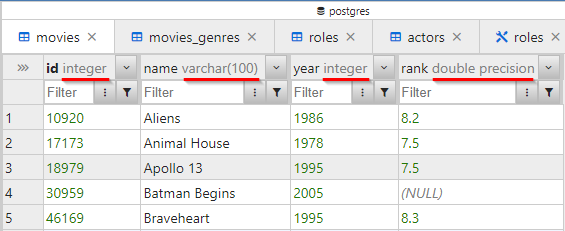
Different common SQL data types are:
INT: whole numbers.DECIMAL,FLOAT: decimal numbers.VARCHAR,NVARCHAR: text.DATETIME: date and time.BIT/BOOL: true/false (boolean).
See the example in table movies:
2. Different functions for different data types
There are various useful functions.
We already know the function COUNT() to calculate the number of rows in a selection:
| count |
|---|
| 36 |
- Here, the number of rows in table
moviesis counted.
2.1. Functions for numbers
Function MIN() gives the lowest, minimum, value:
| min |
|---|
| 1972 |
Function MAX() gives the highest, maximum, value:
| max |
|---|
| 2005 |
Function AVG() (average) gives the average:
| avg |
|---|
| 7.791176470588234 |
Function SUM() gives the sum:
| sum |
|---|
| 264.9 |
2.2. Functions for text
Function LENGTH() gives the length, the number of characters, of the text:
| name | length |
|---|---|
| Aliens | 6 |
| Animal House | 12 |
| Apollo 13 | 9 |
| ... | ... |
Note:
LENGTH()does not work in all SQL dialects.
Function UPPER() gives the text in uppercase:
| name | upper |
|---|---|
| Aliens | ALIENS |
| Animal House | ANIMAL HOUSE |
| Apollo 13 | APOLLO 13 |
| ... | ... |
Function LEFT(column_name, <n>) gives the number of characters from the left:
| name | left |
|---|---|
| Aliens | Ali |
| Animal House | Ani |
| Apollo 13 | Apo |
| ... | ... |
- You specify the number of characters.
Function REPLACE(column_name, <old_string>, <new_string>) gives the text where you can replace characters. This function is case-sensitive.
| name | replace |
|---|---|
| Aliens | Prefix_Aliens |
| Animal House | Prefix_Animal House |
| Apollo 13 | Prefix_Apollo 13 |
| Batman Begins | Batman Begins |
| Braveheart | Braveheart |
| ... | ... |
- You specify the old and new text.
- Note that you place the texts between single quotes.
Function CONCAT(<string_1>, ..., <string_n>) concatenates different texts:
| name | replace |
|---|---|
| Aliens | before_Aliens_after |
| Animal House | before_Animal House_after |
| Apollo 13 | before_Apollo 13_after |
| Batman Begins | before_Batman Begins_after |
| Braveheart | before_Braveheart_after |
| ... | ... |
- You specify the old and new text.
- Note that you place the texts between single quotes.
2.3. Functions for dates
In our IMDb database, there are no dates.
But the following functions can be used with dates:
Function EXTRACT(YEAR FROM <date>) gives the year of a date:
| current_date | current_year |
|---|---|
| 2023-08-22 10:32:15.129857+00 | 2023 |
Function NOW() gives the current date and time:
Function EXTRACT(MONTH FROM <date>) gives the month of a date:
| current_date | current_month |
|---|---|
| 2023-08-22 10:34:09.949947+00 | 8 |
There are many more functions. The above overview shows only an indication of commonly used functions. Note: There are differences between SQL dialects.
Summary
- Every column in an SQL database table has a data type.
- It affects memory usage.
- You can use different functions for different data types.
- Common data types are:
INT: whole numbers.DECIMAL,FLOAT: decimal numbers.VARCHAR,NVARCHAR: text.DATETIME: date and time.BIT/BOOL: true/false (boolean).
- Commonly used functions are:
- General:
COUNT(): count the number of rows.
- Numbers:
MIN(): gives the minimum value.MAX(): gives the maximum value.AVG(): gives the average.SUM(): gives the sum.
- Text:
LENGTH(): gives the number of characters.UPPER(): gives text in uppercase.LEFT(): gives the first number of characters.REPLACE(): replaces one text with another text.CONCAT(): concatenates texts.
- Dates:
YEAR(): gives the year.MONTH(): gives the month.
- General: