
Primary and foreign keys
Introduction
A database usually consists of:
- Multiple tables.
- That have relationships with each other.
You define these relationships by linking keys to columns.
- Primary keys.
- Foreign keys.
In this module, we will look at:
- Why multiple tables with interrelationships are useful.
- What primary and foreign keys are.
1. Relationships between tables
We are working with the IMDb database.
It contains data about movies.
1.1. Table movies
The database contains multiple tables, including the table movies.

In this table, each row is a unique movie.
For example:
| id | name | year | rank |
|---|---|---|---|
| 10920 | Aliens | 1986 | 8.2 |
| 17173 | Animal House | 1978 | 7.5 |
| 18979 | Apollo 13 | 1995 | 7.5 |
| ... | ... | ... | ... |
We have information on 36 movies in this table.
1.2. Table roles
There is also a table roles.
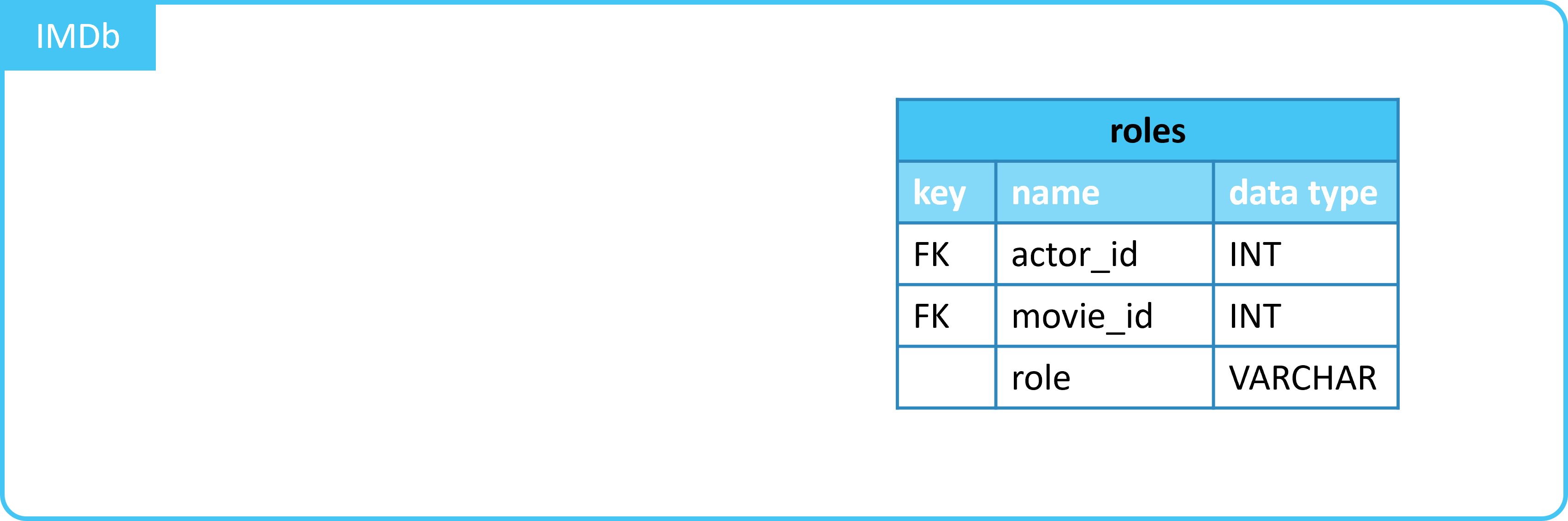
In this table, each row is a role from a movie.
For example:
| actor_id | movie_id | role |
|---|---|---|
| 16844 | 10920 | Lydecker |
| 36641 | 10920 | Russ Jorden |
| ... | ... | ... |
| 22591 | 17173 | Chip Diller |
| 43842 | 17173 | Charming guy with guitar |
| ... | ... | ... |
| 7979 | 18979 | Anchor |
| 9275 | 18979 | Mission Controller |
| ... | ... | ... |
1.3. Linking movies and roles
1.3.1. Data in 1 table
We have data on:
- Movies
- Roles in movies
We could process this in 1 table.
Each row would then be a role, with the associated movie.
See the example below:
| id | name | year | rank | actor_id | role |
|---|---|---|---|---|---|
| 10920 | Aliens | 1986 | 8.2 | 16844 | Lydecker |
| 10920 | Aliens | 1986 | 8.2 | 36641 | Russ Jorden |
| ... | ... | ... | ... | ... | ... |
| 17173 | Animal House | 1978 | 7.5 | 22591 | Chip Diller |
| 17173 | Animal House | 1978 | 7.5 | 43842 | Charming guy with guitar |
| ... | ... | ... | ... | ... | ... |
| 30959 | Batman Begins | 2005 | (NULL) | 7979 | Anchor |
| 30959 | Batman Begins | 2005 | (NULL) | 9275 | Mission Controller |
| ... | ... | ... | ... | ... | ... |
In this case, there are 6 columns * 1,989 rows = 11,934 data points.
1.3.2. Data in 2 tables: movies and roles
We work with two tables.
- Table
moviescontains columnid- A unique number for each unique movie.
- Table
rolescontains columnmovie_id- This allows you to link tables
moviesandroles.
- This allows you to link tables
With the
JOINcommand, you can merge data from tables. We will discuss this in detail later.
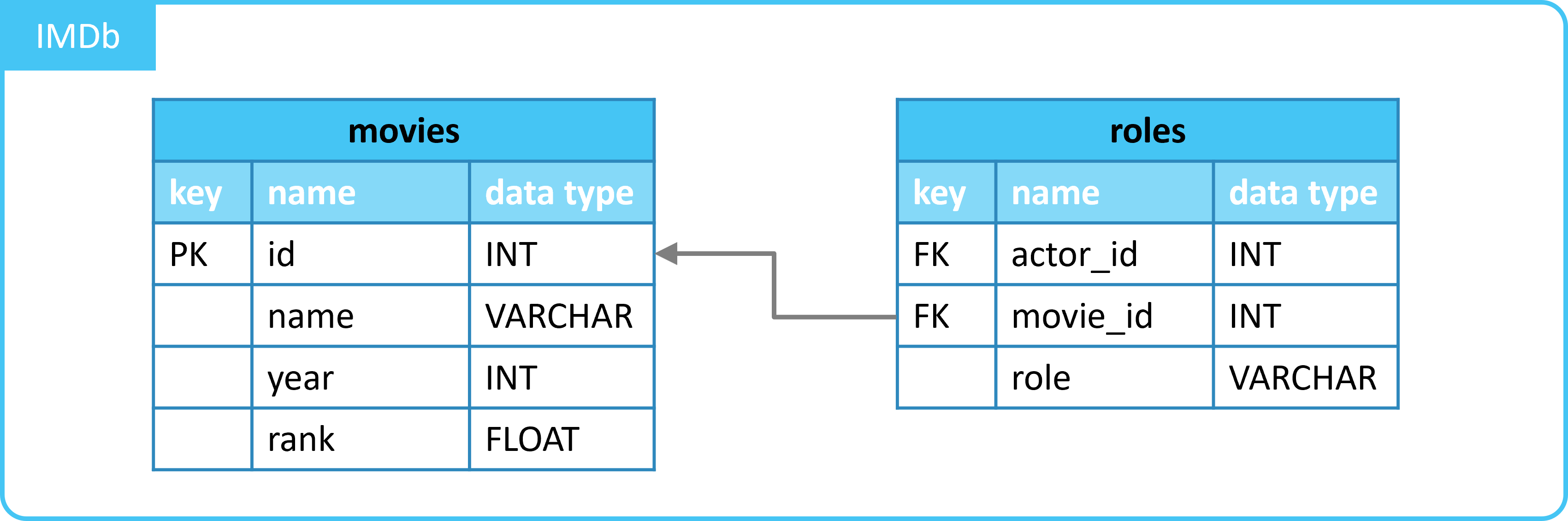
In this case, we have 2 tables:
movies: 4 columns * 36 rows = 144 data points.roles: 3 columns * 1,989 rows = 5,967 data points.
This makes a total of 144 + 5,967 = 6,111 data points.
- With 1 table: 11,934 data points.
- With 2 tables: 6,111 data points.
- With 2 tables, almost half the number of data points.
1.4. Advantages of multiple tables
In the example of tables movies and roles, we saw that 2 tables lead to significantly fewer data points.
This has several advantages:
- Less storage capacity is needed.
- It is more organized.
- Specific details.
moviescontains only high-level details of moviesrolescontains only high-level details of roles
- Adjustments.
- If you want to change a feature of one movie, you only need to do it in one place.
- Specific details.
2. Primary keys
2.1. Introduction
We now know that a data model with multiple tables with interrelationships has advantages.
For this, the relationships between tables must be defined.
You indicate these relationships with keys.
First, the primary key. For this, we look again at the tables movies and roles.
Table movies
- In table
movies, each row is a unique movie. - Column
id(identifier) contains a unique number for each movie.
Table roles
- In table
roles, each row is a unique role in a movie. - Column
movie_idcontains theidof a movie.
2.2. Primary key in table movies
Column movie_id from table roles contains values that can be found in column id in table movies.
- This way, tables
moviesandrolesare linked via the columnsmovies.idandroles.movie_id.
Column id in table movies is the primary key here.
- A unique number for each unique movie.
2.3. Properties
Primary keys have the following properties:
- It is a column (or combination of columns) that makes rows in a table unique.
- Each table can have only one primary key.
- The primary key must not be empty (
NULL).
3. Foreign keys
3.1. Introduction
We have seen what the primary key is.
Now we look at the foreign key. For this, we look again at the tables movies and roles.
3.2. Foreign key in table roles
In table roles, column movie_id contains values from column id in table movies.
- Column
idin tablemoviesis defined as a primary key in this table.
A column that links to a primary key in another table must be defined as a foreign key.
- Column
movie_idin tablerolestherefore has a foreign key on columnidin the tablemovies.
3.3. Properties
Columns with foreign keys have the following properties:
- Each table can contain multiple foreign keys.
- It links a column to the primary key in another table.
- The values in the column with foreign key always appear in the column with primary key in the other table.
- If an attempt is made to add a value to the foreign-key column that does not exist in the primary-key column, the database will give an error message.
4. Keys as constraints
With the example below, we apply constraints when creating a table:
CREATE TABLE roles (
  actor_id INT UNIQUE NOT NULL,
  movie_id INT NOT NULL,
  role VARCHAR (50) NOT NULL
);
We use the constraints UNIQUE and NOT NULL.
In our table, we want to apply a primary and foreign key:
For this, we can also use constraints:
CREATE TABLE roles (
  actor_id INT PRIMARY KEY,
  movie_id INT FOREIGN KEY,
  role VARCHAR (50) NOT NULL
);
PRIMARY KEY: Combination ofUNIQUEandNOT NULL: unique and no missing values.FOREIGN KEY: Ensures a relationship between tables by not allowing values in the foreign key column that do not appear in the primary key column.
Summary
- Dividing data into multiple tables:
- Less storage capacity is needed.
- It is more organized.
- Keys are constraints that describe the relationships between tables.
- Primary keys:
- Applied to the column that identifies unique objects in a table.
- Often indicated in a schema with PK or a 🔑 symbol.
- Only one primary key per table.
- Must not be empty (
NULL). - Values must be unique.
- Foreign keys:
- Applied to a column that links to a primary key in another table.
- Often indicated in a schema with FK.
- Multiple foreign keys per table possible.
- Values in a column with a foreign key must appear in the column with the primary key to which it is linked.
- Primary keys: